
What Hardware Considerations Come With Epson ColorWorks C8000 Label Printing
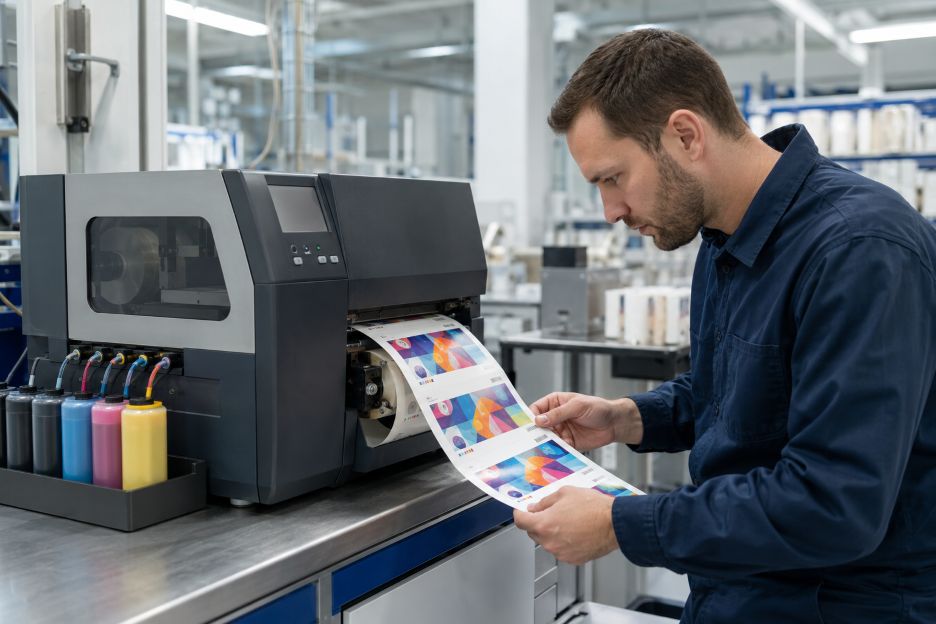
The Epson ColorWorks C8000 is a four-inch color inkjet label printer designed for mid- to high-volume, on-demand production. It prints variable product, identification, warehouse, and logistics labels at speeds of up to 11.8 inches per second. The official Epson ColorWorks C8000 product specifications state that this speed is achieved while printing at 1200 by 600 dpi.
For production managers evaluating the hardware, print volume is only the starting point. The print engine, ink supply, supported materials, media path, physical footprint, and maintenance parts all influence how the machine fits into a labeling operation. Selecting suitable Epson C8000 labels also requires matching the face material and coating to the printer’s pigment ink and the conditions in which the finished label will be used.
A Print Engine Built for Batch Production
The C8000 uses Epson’s PrecisionCore Heat-Free inkjet technology and a permanent printhead. Unlike thermal label printers, it does not rely on heat-sensitive media or a transfer ribbon to create an image. Microscopic ink droplets form the graphics, text, and barcodes directly on coated label stock. This allows a single device to print variable information and full-color artwork during the same pass.
Print speed deserves attention when comparing the machine with existing equipment. Epson positions the model for batch runs rather than occasional desktop output, but actual throughput will still depend on label dimensions, print settings, image coverage, cutting frequency, and data-processing time. The Epson America product announcement describes the printer as suitable for prime labels, boutique products, product identification, warehousing, and logistics. Those uses can place very different demands on resolution and production pace.
Automatic nozzle verification is another relevant feature of the print engine. The system monitors nozzle performance and can compensate for detected problems, helping maintain readable barcodes and consistent output. Even so, operators still need procedures for print checks, cleaning, and media testing. A permanent printhead reduces routine replacement requirements, but it also makes proper maintenance and compatible consumables important over the hardware’s working life.
The Ink Pack System
Although ink supply is sometimes described generally as a cartridge system, the C8000 uses four high-capacity ink packs. Cyan, magenta, yellow, and black packs provide a combined capacity of 1.9 liters. That capacity is intended to reduce interruptions during large runs, although page or label yield varies with artwork coverage, cleaning cycles, print frequency, media type, temperature, and humidity.
Businesses must choose between gloss-black and matte-black printer configurations. This is a hardware and supply decision rather than a setting that can be changed freely. The Epson CW-C8000 Series User’s Guide explains that the printer will not operate if a different black-ink type is installed. Buyers therefore need to consider their usual media finish before selecting a configuration.
The same guide notes that all four packs must be installed for printing. Ink from every color may also be consumed during head cleaning and other maintenance, including when output is primarily monochrome. Initial setup uses part of the supplied ink to charge the printhead, while a small amount remains when a pack reaches its replacement point. These details matter when estimating consumable use from purchase prices alone.
A replaceable maintenance box collects ink discharged during cleaning and related operations. It is a separate consumable, so procurement plans should account for it alongside ink and label rolls. The control panel displays approximate ink levels and available maintenance-box capacity, allowing replacements to be prepared before the printer stops.
Media Handling and Label Compatibility
Media handling affects both workflow and the range of jobs the printer can accept. The unit accommodates labels up to approximately four inches wide and provides a maximum printable width of 4.25 inches. It supports continuous stock, die-cut labels, black-mark media, and other compatible roll-fed formats. Exact width, thickness, gap, and sensing requirements should be checked against Epson’s media specifications before stock is ordered in volume.
The printer includes an automatic cutter, which is useful for separating batches or continuous material. Operations that need finished rolls may also require an external rewinder. This adds equipment, floor space, power, and setup considerations that may be easy to overlook when reviewing the printer by itself.
Ink-receptive coatings are essential because ordinary uncoated label materials may absorb pigment ink unevenly, dry slowly, or produce weak color and barcode edges. Epson’s user documentation specifically warns that slow-drying and water-repellent papers can cause staining. Testing the intended paper or synthetic material with the actual artwork remains more informative than judging compatibility from size alone.
Hardware Factors in Context
The C8000 combines a high-speed permanent printhead, large ink packs, integrated cutting, and industrial-style media handling in one device. Those features also bring practical dependencies, including model-specific black ink, coated media, maintenance boxes, sufficient installation space, and possible finishing equipment. These considerations reflect the wider importance of reliable hardware infrastructure in maintaining consistent business operations. Future evaluation will therefore depend on how closely the printer’s physical requirements match an organization’s label sizes, production patterns, durability needs, and existing workflow.



 Technology has made business faster, smarter, and more connected than ever. Behind every smooth digital operation lies two key elements, computer hardware and online reputation management (ORM). While one powers the systems, the other protects your name. Understanding both is essential for anyone running a modern business, whether you’re a tech store, freelancer, or corporate brand.