
Menu

Haxasia

Great Machine Hardware

Computer

Paid Reddit Engagement in the PC Space: $20 Gets You 100 “Looks Clean!” Comments on Your Next Build

Over 40% of front-page posts on r/buildapc in 2025 now receive their first 50 upvotes within ten minutes of posting. That speed used to be impossible without serious luck or a massive following. Today, it’s often just a $15–25 purchase.

Reddit has quietly become the most important marketing channel for small PC hardware brands, custom case makers, and even individual builders who want their RGB-drenched battle station to hit the front page. The tool making it happen? Third-party services that sell upvotes and comments from real-looking accounts.
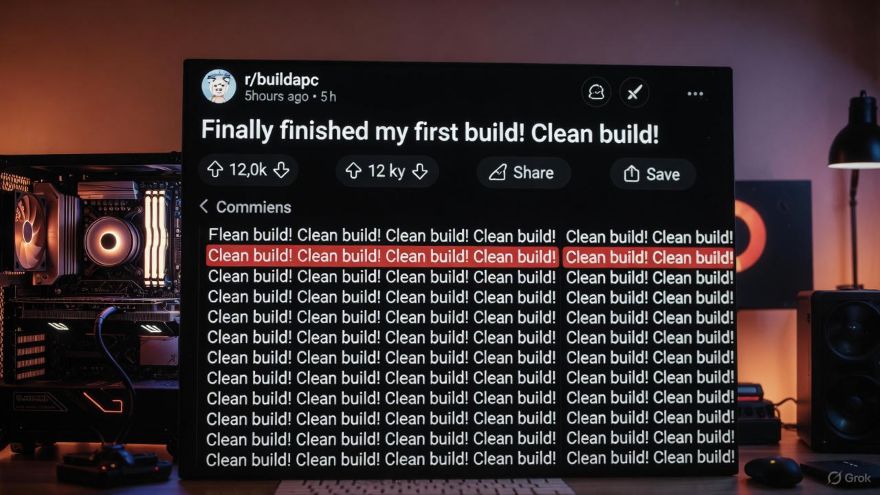
r buildapc in 2025

What These Services Actually Cost in 2025

Prices have crashed since the pandemic-era highs. Here are real quotes pulled from active panels this month:

  • 50 upvotes + 15 generic comments → $12–18
  • 100 upvotes + 40 custom comments → $28–35
  • 200 upvotes + 80 aged-account comments with replies → $65–90
  • “Slow drip” delivery over 24–48 hours (looks natural) → +40% to the price
  • Guaranteed top comment or sort-by-new burst → $100+

Yes, for roughly the price of a decent SATA SSD, you can buy a small avalanche of “cable management on point” and “what case is that?” comments.

READ ALSO: Computer Hardware and Online Reputation Management in the Digital World

Who Is Actually Buying This Stuff?

Everyone, it turns out.

Small Chinese brands like Gamemax, Jonsbo clones, and no-name AIO makers use paid engagement to get their first few showcase posts rolling. Indie mechanical-keyboard startups on Kickstarter drop $50–200 before launch week. Even some bigger YouTube tech channels quietly seed their “just finished my build” threads hours before the video goes live.

But the surprising group? Regular builders. Hundreds of people with 0–2k karma pay for a little push so their first big build doesn’t die in new with three upvotes. One user I spoke to spent $22 and got 147 upvotes and 63 comments. His post hit #1 on r/pcmasterrace for six hours. He called it “cheaper than therapy.”

How to Spot Paid Comments in the Wild

After watching thousands of these posts, patterns jump out fast:

  • Ten near-identical “clean build!” comments in the first 20 minutes
  • Accounts created 2–5 years ago, 20–300 karma, almost zero post history
  • Heavy emoji use and exclamation marks
  • Questions that never get replied to, even when asked direct questions
  • Sudden score hiding by mods (a big red flag)

Pro tip: Click the username. If the account only comments on build posts and nothing else, it’s probably rented.

The Ethical Debate Heating Up in Mod Discords

Moderators hate it. Users feel betrayed when they find out their favorite “wholesome” thread was bought. Yet some defenders argue it’s no different from running Facebook or TikTok ads. One r/buildapc mod told me privately,

“We remove the obvious ones, but we can’t catch everything. At this point it’s like whack-a-mole with a firehose.”

Services adapt quickly. They now offer Reddit comments at an affordable cost cost from accounts that have years of normal-looking activity in unrelated subreddits. Detection gets harder every month.

Should You Ever Pay for Reddit Engagement?

If you sell PC parts or cases, a small boost can snowball into real organic growth. Plenty of now-legitimate brands started this way. For personal builds, though? Most veterans say no. Getting 300 fake “fire build bro” comments feels good for a day, then hollow. Real praise from strangers who actually like your loop or color scheme hits different.

One builder summed it up perfectly: “If your build is mid, no amount of bought comments will save it long-term. If the build slaps, it will climb on its own eventually.”

Final Takeaway

Paid Reddit engagement is now a standard marketing expense for many hardware companies, just like buying thermal paste samples or review units. Knowing it exists doesn’t ruin the subreddit; it just sharpens your eyes. Next time you see a perfect cable-managed ITX build explode to 15k upvotes in four hours, you’ll know exactly what probably happened behind the scenes.

The front page of r/buildapc isn’t dead. It’s just running on the same rules as the rest of the internet in 2025: some of the shine is manufactured, but the really good stuff still breaks through.

Read More

Computer Hardware and Online Reputation Management in the Digital World

Technology has made business faster, smarter, and more connected than ever. Behind every smooth digital operation lies two key elements, computer hardware and online reputation management (ORM). While one powers the systems, the other protects your name. Understanding both is essential for anyone running a modern business, whether you’re a tech store, freelancer, or corporate brand.

Understanding Computer Hardware

Computer hardware refers to the physical parts of a computer system. These are the components you can touch and see such as the monitor, keyboard, mouse, and internal parts like the CPU, RAM, motherboard, and hard drive. Each of these pieces has a specific job:

  • CPU (Central Processing Unit) acts as the brain of the computer, handling instructions and running programs.
  • RAM (Random Access Memory) stores temporary data that your computer needs to perform tasks quickly.
  • Storage drives (HDD or SSD) hold long-term data, from files to software.
  • Motherboards connect all the parts together so they can communicate.

Why Computer Hardware Matters in Online Reputation Management

Online reputation management focuses on how individuals or businesses are perceived on the internet. It involves monitoring, maintaining, and improving the public image across platforms like Google, social media, and review sites.

However, this process heavily depends on reliable computer hardware. A system that crashes or runs slowly can delay responses to reviews, harm productivity, and limit the ability to track brand mentions in real time. For businesses, poor hardware can result in lost data, missed notifications, and delays in customer communication—all of which can damage online reputation.

For example, imagine a customer posting a negative review about a delayed shipment. If your computer system fails to alert your team right away, that comment could stay unanswered for days. A delay like that can make your business appear careless. Good hardware prevents such issues by ensuring quick access, stable connections, and smooth workflow.

Building a Reliable Hardware Setup for ORM

To manage your online reputation effectively, you need computer hardware that supports heavy data processing, fast communication, and security. Below are some recommendations:

  • Use a powerful CPU and enough RAM

Online reputation tools—like social media management dashboards, SEO trackers, and analytics platforms—often run multiple processes. A fast processor and sufficient RAM help your system multitask without lag.

  • Invest in solid-state drives (SSD)

SSDs are faster and more reliable than traditional hard drives. They reduce boot times and improve the speed of saving and retrieving files. This helps when handling large amounts of review data or storing client feedback securely.

  • Choose reliable networking hardware

A strong internet connection backed by high-quality routers and modems ensures smooth online operations. Slow or unstable connections can interrupt tasks like monitoring mentions or uploading response videos.

  • Add security hardware

Firewalls and secure servers protect sensitive data. In online reputation management, data breaches can ruin trust faster than bad reviews. Investing in network security hardware helps prevent such risks.

  • Use backup systems

Hardware like external drives or network-attached storage (NAS) devices can back up your ORM data. In case of system failure, you can recover reports, analytics, and client communication without losing valuable information.

These upgrades may seem technical, but they make a big difference in how efficiently you can manage your brand image online.

How ORM Tools and Hardware Work Hand in Hand

Online reputation management relies on specialized software that constantly scans and updates information across the web. Programs like Google Alerts, Brand24, or Mention help track brand mentions. Others, like Hootsuite and Sprout Social, help manage responses and schedule posts.

All of these tools run on computer hardware. The stronger your setup, the faster and smoother these tools perform. For example, a computer with higher RAM can load multiple ORM dashboards simultaneously. A good graphics card can help design professional visuals for reputation recovery campaigns.

This partnership between hardware and ORM tools also supports automation. Automated monitoring and reporting save time, but they require hardware with enough processing power to handle ongoing background tasks.

Protecting Hardware to Protect Reputation

Just like your reputation needs monitoring, your hardware needs care. Regular maintenance ensures your computer remains reliable, preventing downtime that can harm your responsiveness. Some easy practices include:

  • Cleaning dust from hardware components to prevent overheating.
  • Updating drivers and firmware to improve performance.
  • Using surge protectors to safeguard against sudden power loss.
  • Scheduling regular system backups.
  • Keeping your hardware in top condition helps you maintain your reputation strategy without interruptions.
Read More

Building A Custom PC What You Need To Know

Building your own PC can be exciting, educational, and cost-effective. Whether you’re aiming for high performance, gaming, video editing, or general use, understanding the components and process is key.

To build a functioning PC, you’ll need the following hardware:

CPU (Central Processing Unit) – The brain of your PC; choose based on performance needs.

Motherboard – Connects and communicates with all components. Must be compatible with the CPU and form factor.

RAM (Memory) – Short-term memory that affects multitasking. 16GB is standard for most users; 32GB+ for heavy tasks.

Storage – SSDs for speed (faster boot/load times), HDDs for larger, cheaper storage.

GPU (Graphics Card) – Essential for gaming, video editing, and rendering. Choose based on resolution and budget.

Power Supply Unit (PSU) – Powers all components. Choose a reputable brand with enough wattage and efficiency ).

Case – Houses all parts. Consider airflow, size, and aesthetics.

Cooling (Fans or Liquid) – Keeps temperatures in check. Stock coolers work for most, but high-performance systems may need upgrades.

Optional: Optical drives, Wi-Fi cards, RGB lighting, sound cards.

https://haxasia.com

Read More
𐌢